

Background
The only way to experience an experience is to experience it!”
– Bill Moggridge (Designer of the first laptop computer)
Any human-centered design process heavily depends on the interaction with the future users (or target audiences) of the envisioned product. A product in this sense can be anything from a new dashboard, a future organizational process or even a strategy. All these “products” can be seen as experiences and each of these experiences can be prototyped (see Method “Prototyping”).
In the agile world we rely less on the so called “waterfall approach” in which you first create an exact document to describe all requirements and then execute based on that document. Instead, we develop future solutions by iterating our way towards the best version of the product. Usually, the design and development team start with low-resolution prototypes (e.g., paper prototypes or rough sketches), then move along towards more high-resolution prototypes (e. g., click-dummies or mock-ups) and finally start implementing the product (often via a Minimum Viable Product – MVP). All of these steps should be accompanied by testing. One of the most effective methods for testing (software) products is the so called think aloud testing method.
Step by Step Instructions
In order to do a think aloud test you need an experience (in form of a prototype or an existing product) which you would like to test. For example, you can choose to do a think aloud test based on an existing PowerBI dashboard to learn about the challenges users might face when interacting with the dashboard. Or, you could create an artifact which makes your concept of a future dashboard as tangible as possible and enables the tester to “experience the experience” of the future when this dashboard will be live (e.g. on paper, PowerPoint or an online collaboration board).
- Prepare the prototype in a way that it requires a minimum of explanation from your side. It should be as close to reality as possible. Unless you are working in the real development environment (e.g. PowerBI) the mantra for this step is: “fake it until you make it!”
- Choose the users you want to do the test with. (More information on how to choose users: see below)
- Describe a scenario the user has to accomplish by using your prototype. For example: “Your manager has called you because the numbers in your area of responsibility seem unusual. Please find the relevant numbers in the dashboard and prepare an answer for your manager. How would you go about it?” Make sure the scenario is relevant and realistic for the user you want to test it with. Make sure you start the scenario at a relevant point (e.g. do you want to test, if the user finds your product on the internal servers? Do you want to test how they log onto your system or do you just want to test your dashboard?)
- Invite the test user to fulfill the scenario you have prepared for them. Ensure them that you are here to learn from them not to evaluate their skills with a certain tool. After all, bad design is the designers mistake not the users!
- Ask them to speak out loud whatever they think. The user should explain verbally every step s/he takes: e.g. “I am searching for KPI XYZ, so I go to this tab and click on it. … Oh, this looks very weird … The date is wrong… Let me see, where can I change the date? While the user is trying to fulfill the task take notes of all the important things.
Ideally you have one note taker and one person who leads the testing session (interviewer). This enables the interviewer to really focus on the person. The 80/20 rule applies here: the user should speak 80 percent of the time! Remember: you are testing a solution, not selling it to the user! As a note taker, make sure to capture full quotes rather than mere words. This will make it much easier to remember later what the users said. Additionally, you can use a feedback gathering method to structure the user feedback (see method Gathering Feedback). - Once the user has finished their task you can ask further questions. Make sure not to ask too hypothetically. Things like “Would you use this?” will not give you much information because the user might be polite and say yes. Instead, ask open questions such as “What do you think about this prototype?” or “Where do you see general room for improvement?”
- Thank the user and ask them if and how much you can involve them in the further process.
- Collect the feedback of the different user tests you have conducted. Ideally you collaborate with your design team in order to make sense of the user feedback (see Method Working with a whiteboard, especially the section on divergent and convergent thinking).
- Adapt your prototype according to the aggregated feedback. Be aware that individual users might have opinions which do not fit into the greater scope of your product. Just because you tested with them it does not mean that you implement all the feedback. Feedback is a gift, but this should not hinder you from critically looking at it. Often it helps to challenge some of the things a user says (e.g. If the user wants a red button you should try to understand why? Maybe s/he only wants the specific button to be more visible and moving it to another area on the screen is actually the better solution than a red button.)
Sometimes Feedback can also be disregarded if you have good reasons for it (e.g. the user wants to see additional information but this is not easily available in the system.) - Make sure you document your decisions for later reconsideration or future versions of your product.
The extreme user framework
There is a great framework for choosing testers while at the same time enabling you not to do too many tests. It is called the extreme user framework.
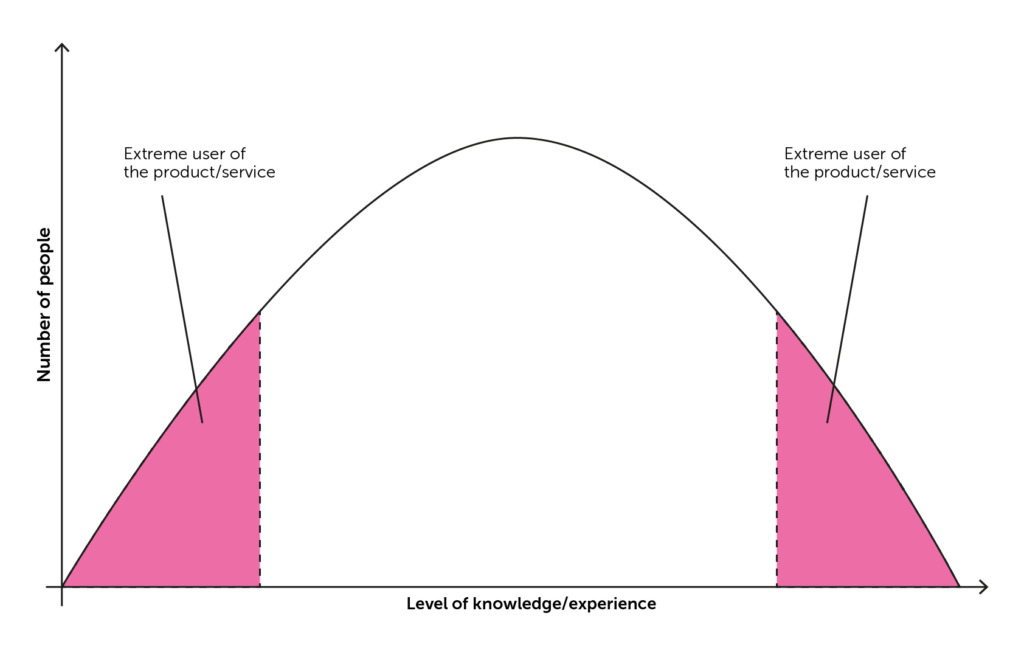
Categorize your users along the X-axis according to their level of knowledge regarding the topic (e.g. filing of taxes, when you try to work on a tax related problem) or the level of expertise with a certain tool (e.g. PowerBI, if you are designing for PowerBI). Now, take a look at the number of possible users on the Y-axis.
Usually, within any group of people you will find some kind of normal distribution. A few people might be real experts, some might not have any experience at all. Most will be somewhere in the middle.
For testing your prototype, you will learn most quickly from the extremes: people who don’t know the topic or tool at all and people who deal with this on a regular basis. After testing with 4-6 people their answers will start repeating and you will be able to see patterns.
The same framework can also be used for initial research before even coming up with ideas for solutions.
Watch this video for tips from the pros
RELATED METHODS
PrototypingGathering feedback
Working with whiteboards
Interviews for empathy